
59 lines
2.6 KiB
Markdown
59 lines
2.6 KiB
Markdown
一、启用 [SSH 服务](https://zhida.zhihu.com/search?content_id=201432023&content_type=Article&match_order=1&q=SSH+%E6%9C%8D%E5%8A%A1&zhida_source=entity)
|
||
--------------------------------------------------------------------------------------------------------------------------------------------------
|
||
|
||
### 1、转到 Synology 设备的终端设置页面:
|
||
|
||
Synology NAS:[DSM 控制面板](https://zhida.zhihu.com/search?content_id=201432023&content_type=Article&match_order=1&q=DSM+%E6%8E%A7%E5%88%B6%E9%9D%A2%E6%9D%BF&zhida_source=entity) > 终端机和 SNMP > 终端机
|
||
|
||
[Synology Router](https://zhida.zhihu.com/search?content_id=201432023&content_type=Article&match_order=1&q=Synology+Router&zhida_source=entity):SRM 控制面板 > 服务 > 系统服务 > 终端机
|
||
|
||
### 2、选中启用 SSH 服务。
|
||
|
||
指定 SSH 连接的端口号并保存设置。为了确保系统安全性,建议将默认端口 22 替换为其他端口号。
|
||
|
||
### 3、对于 DSM 6.0 或更高版本
|
||
|
||
在计算机上启动终端应用程序:
|
||
|
||
Windows 10:Windows PowerShell
|
||
|
||
macOS:Terminal.app
|
||
|
||
Linux:Terminal
|
||
|
||
1.键入以下命令并按 Enter 键:
|
||
|
||
| 命令 | 示例 |
|
||
| --- | --- |
|
||
| ssh DSM 管理员帐户@DSM IP 地址 -p SSH 端口号 | ssh myadmin@10.17.2.6 -p 22 |
|
||
|
||
2.输入 DSM 管理员帐户的密码。
|
||
|
||
3.键入 sudo -i 并按 Enter 键。
|
||
|
||
4.再次输入 DSM 管理员帐户的密码并按 Enter 键。
|
||
|
||
5.您现在已通过 SSH 使用 root 权限登录到 DSM。
|
||
|
||
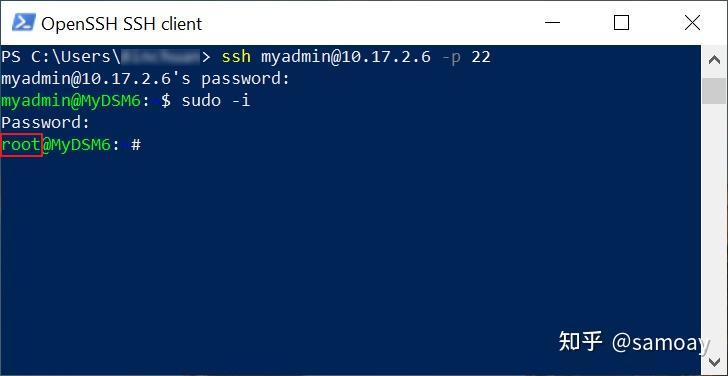
|
||
|
||
二、 删除所有@eaDir文件夹
|
||
----------------
|
||
|
||
###
|
||
1、查看卷并输入清除命令
|
||
|
||
\# 看看你有多少个卷空间,默认\*号基本是1开始
|
||
ls -d /volume\*
|
||
\# 删除所有卷下所有@eaDir文件夹
|
||
find /volume\* -name "@eaDir" -type d -print0 | xargs -0 rm -rf
|
||
|
||
如果闲麻烦,可以加到计划任务中定期执行,在计划任务中只运行最后一条命令即可。
|
||
|
||
### 2、 停止生成@eaDir文件夹及关闭此停止方法
|
||
|
||
@eaDir文件夹是因为群晖DSM系统“[全局搜索](https://zhida.zhihu.com/search?content_id=201432023&content_type=Article&match_order=1&q=%E5%85%A8%E5%B1%80%E6%90%9C%E7%B4%A2&zhida_source=entity)”服务产生的。如果平时用不上群晖的“全局搜索”服务,可以直接关闭。**_如果你使用DS Drive、[Video Station](https://zhida.zhihu.com/search?content_id=201432023&content_type=Article&match_order=1&q=Video+Station&zhida_source=entity)、Moments,不建议关闭!_**
|
||
|
||
关闭方法:仍然是root账号下执行以下命令
|
||
|
||
synoservice --disable pkgctl-SynoFinder |